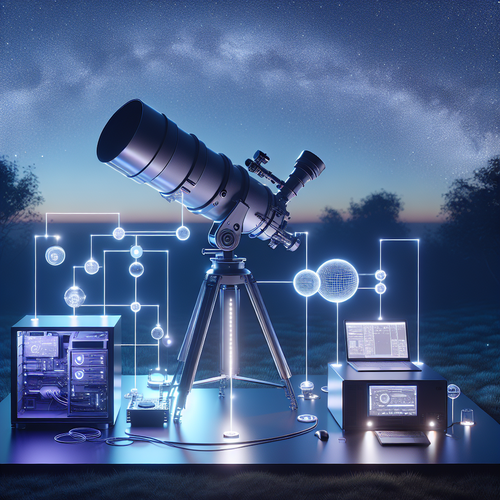
Crafting a Seamless Astronomy Session Report Workflow with n8n and Seestar S50
Why Build a Session Report Workflow for Your Astronomy Hobby?
If you spend your nights under the stars with a telescope like the Seestar S50, you probably know how messy it is to keep track of your sessions: what you observed, the conditions, settings on your gear, and the results. Jotting notes in a notebook or an app quickly feels cumbersome, especially when you want to focus on the observing itself.
Enter automation. By building a “session report” workflow with n8n—a powerful, open-source automation tool—you can transform raw session data into polished reports, automatically log your observations, and even prepare your post-session summaries ready to share or analyze.
In this article, I’ll dive into how to architect and implement this workflow, tackling edge cases and optimization tips for those of you who are deep into the data side of astronomy gear like the Seestar S50.
What Makes a Good Session Report Workflow?
Think of your session report as a digital diary entry but far smarter:
- Structured: It pulls in data consistently from your telescope, weather data, and manual notes.
- Timely: Generates summaries shortly after your session ends.
- Scalable & Robust: Handles multiple sessions, large datasets (imaging logs, sensor readings), and occasional device hiccups.
- Extensible: Easy to add new data sources or output formats.
The challenge is how to do this without hours of manual data wrangling.
The Tools and Data Sources
- Seestar S50 Telescope: Provides status, alignment info, and tracking data through its API or local logs.
- Environmental Sensors: Temperature, humidity, and sky transparency tied to your observing location.
- Manual Inputs: Observing notes or photos you add post-session.
- n8n: Your automation orchestrator, running on local hardware or a server.
Step 1: Designing the Data Flow
The session report workflow is essentially a data pipeline:
- Trigger the workflow—probably a manual start or a schedule tied to your session timing.
- Collect raw data from the Seestar S50 via REST API calls or reading its logs.
- Fetch environmental data from your preferred weather API or local sensors.
- Ingest manual notes stored in a markdown file or note-taking app.
- Process and format the raw data into readable report sections.
- Store or send the report via email, upload to a note system, or push to a personal blog.
Each step is an n8n node or series of nodes.
Step 2: Implementing Key Nodes in n8n
2a. Data Pull from Seestar S50
The Seestar S50 doesn’t have the biggest ecosystem but provides:
- Local API endpoints for status info.
- Log files on your connected Raspberry Pi or laptop.
In n8n, I use the HTTP Request node to pull parsed JSON from the API. Handle authentication and retries gracefully here; the telescope might drop connections mid-session.
2b. Environmental Data
Use an HTTP Request node too, querying services like OpenWeatherMap or custom sensors publishing MQTT data. If MQTT is used, n8n’s MQTT Trigger node continuously listens to sensor updates.
2c. Manual Notes
I personally sync my notes in Markdown files in a shared folder. The Read Binary File node combined with a Function node to parse and convert markdown lets me semi-automatically add human observations.
2d. Data Processing
Here’s where it gets technical:
- Use Function nodes (JavaScript based) to parse, transform, and combine data.
- Handle edge cases, such as missing sensor data, time zone mismatches, or malformed logs.
Example snippet to convert timestamps and merge data:
items[0].json.sessionDate = new Date(items[0].json.sessionTimestamp).toLocaleString('en-US', { timeZone: 'UTC' });
// merge environmental data
items[0].json.weather = $input.all()[1].json;
return items;
Step 3: Optimisation and Edge Cases
Handling Failures
- The Seestar S50 API can intermittently fail or lag during a session. Implement retries with Wait and Error Workflow nodes to alert you if stale data persists.
- Environmental data APIs have rate limits—cache responses locally if possible.
Scaling
If you’re logging dozens of sessions a week with images and telemetry, consider:
- Storing heavy data (photos, raw telescope logs) in cloud storage like S3 and just linking in reports.
- Partitioning workflows by session or time window to reduce runtime and memory pressure.
Real-World Gotchas
- Time synchronization: Confirm all devices (Seestar, sensors, computer running n8n) use consistent time zones.
- Data format changes: Firmware updates can alter API responses, so add sanity checks.
- User input variations: Manual notes often break structure; consider lightweight validation or using forms.
When This Workflow Might Not Be Ideal
- Zero automation preference: If you enjoy the analog notebook feel, automating reports might feel like overkill.
- Highly infrequent sessions: If you observe once in a blue moon, setting up complex workflows might take longer than manual logging.
- Limited connectivity: Remote locations without internet or local network make API calls and cloud integrations tough.
In these cases, a simpler manual or semi-automated approach may suffice.
Putting It All Together
Once your n8n workflow is operational, you have a powerful assistant that compiles your night’s astronomy session:
- Telescope settings and status at session start/end.
- Real-time and historical environmental context.
- Your personal notes, pictures, and even sketches.
- A nicely formatted report automatically emailed or saved.
I run mine after every session, then tweak it over time as new data sources become available or to improve formatting. It’s become invaluable for comparing conditions, improving my observing strategy, and sharing insights with friends.
Final Thoughts
Building advanced workflows like this isn’t trivial, but for the serious amateur astronomer who loves data and automation, the payoff is huge. n8n’s flexibility combined with the capabilities of the Seestar S50 opens a world of possibilities beyond manual logs.
If you dive in, start small — maybe just automate telescope status retrieval or basic notes ingestion — then expand. Be prepared for edge cases and network hiccups, and build retries/drain layers accordingly.
With a little patience, you’ll have a sleek, reliable session report system that lets you focus on what matters: gazing at the stars while your digital assistant handles the paperwork.
Clear skies, happy automating! 🚀🌌








Post Comment