
Why Your Next Camera Project Needs a Single Board Computer
Harnessing the Power of Single Board Computers for Camera Projects
In the ever-evolving world of photography and videography, innovation often hinges on the tools you choose. If you’re passionate about camera projects, integrating a single board computer (SBC) into your setup can be a game-changer. These compact yet powerful devices offer unparalleled flexibility, control, and customization that traditional cameras or bulky computers can’t match. Whether you’re building a time-lapse rig, a security system, or experimenting with computational photography, a single board computer opens doors to possibilities previously limited to professionals or large studios.
What Makes Single Board Computers Ideal for Camera Projects?
Single board computers bring a unique blend of features that cater specifically to the demands of advanced camera projects. Here’s why they stand out:
Compact and Energy Efficient
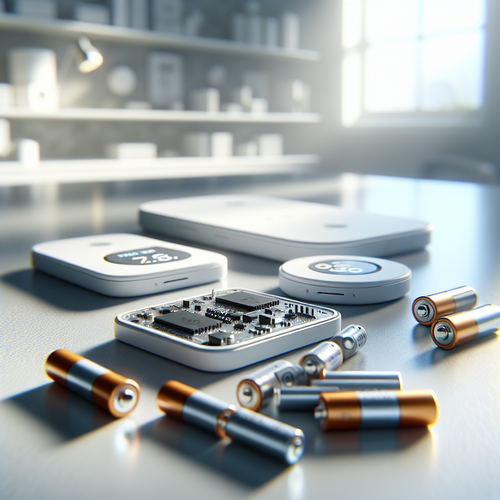
SBCs like the Raspberry Pi or NVIDIA Jetson Nano are small enough to fit in tight spaces, making them perfect for embedded camera systems. Despite their size, they consume minimal power, allowing you to run camera setups in remote or off-grid locations without worrying about excessive energy use.
High Customizability
Unlike conventional camera systems, single board computers allow you to program and tailor each aspect of your project—from image capture intervals to AI-powered object detection. This level of customization can greatly enhance the function and purpose of your camera project.
Key Applications of Single Board Computers in Camera Projects
The versatility of SBCs offers a wide spectrum of practical applications in photography and video setups. Some common and innovative uses include:
Time-Lapse and Interval Photography
By using SBCs, you can set extremely precise intervals for capturing photos, enabling smooth and stunning time-lapse videos. Controllers running custom scripts can also manage exposure, focus, and other settings dynamically during the shoot.
Real-Time Surveillance and Security
Single board computers can power sophisticated security cameras with motion detection and facial recognition capabilities. By integrating open-source software like OpenCV, you can create a smart surveillance system that alerts you instantly on your phone or email.
Advantages of Using SBCs Over Traditional Computing for Camera Projects
Choosing an SBC for your camera projects offers distinct benefits compared to relying on desktop computers or single-function cameras.
Cost-Effectiveness
Many SBCs are affordable, often costing a fraction of traditional computers or specialized camera hardware, which means you can build complex systems without a hefty investment.
Portability and Durability
Their compact size translates to easy deployment in unconventional locations such as drones, underwater housings, or weatherproof enclosures, where bulky devices just don’t fit.
Seamless Integration with Camera Modules
Single board computers can interface directly with camera sensors like the official Raspberry Pi Camera Module or third-party USB cameras, providing high-definition video and photo capture without needing additional adapters.
Getting Started: Building Your First Single Board Computer Camera Project
Embarking on your first camera project with an SBC might sound daunting, but the process can be straightforward with the right approach.
Essential Components You’ll Need
– A suitable single board computer (e.g., Raspberry Pi 4, NVIDIA Jetson Nano)
– Compatible camera module or USB camera
– Power supply (battery pack or mains adapter)
– Storage medium like an SD card or external SSD
– Optional peripherals: display screen, sensors, or networking modules
Basic Setup and Software Choices
Most SBCs support popular operating systems like Raspberry Pi OS or Ubuntu, enabling you to use familiar tools for scripting and automation. For camera control and processing, Python libraries such as picamera or OpenCV offer extensive functionality and community support.
Steps to get started:
1. Assemble the hardware components according to manufacturer guidelines.
2. Install the operating system and necessary drivers for the camera.
3. Write or download scripts to automate photo or video capture.
4. Test and refine your setup to meet your project’s specific goals.
Advanced Features to Explore with Single Board Computers in Camera Projects
Once comfortable with basic functionality, you can leverage SBCs to implement more sophisticated features:
Artificial Intelligence and Machine Learning Integration
Devices like NVIDIA Jetson series allow for real-time object detection, facial recognition, or even style transfer effects on video streams. This adds an intelligent layer to your camera project, enabling dynamic responses based on what the camera “sees.”
Wireless Streaming and Remote Access
By connecting your SBC camera project to Wi-Fi or cellular networks, you can stream live video feeds or remotely manage settings from anywhere in the world. This is especially useful for wildlife monitoring, event coverage, or security purposes.
Common Challenges and How to Overcome Them
While single board computers unlock new potentials for camera projects, a few challenges may arise:
Performance Limitations
Some SBCs have limited processing power compared to full-size computers. To optimize performance:
– Use lightweight operating systems and streamlined software.
– Offload heavy processing to cloud services if internet connectivity is available.
– Choose SBCs that are tailored for AI or video applications, like NVIDIA Jetson.
Power Management
Running camera systems in remote locations requires efficient power solutions. Consider:
– Portable battery packs with solar charging.
– Power-saving software configurations that turn off components when idle.
Inspiration and Resources to Elevate Your Camera Projects
The maker community is a treasure trove of ideas and tutorials on using SBCs for camera projects. Here are some helpful starting points:
– The Raspberry Pi Camera Project repository offers numerous sample scripts.
– NVIDIA’s developer forums and tutorials provide guides for Jetson-powered AI cameras.
– Platforms like Hackster.io and Instructables feature step-by-step builds and project inspiration.
– OpenCV’s official site hosts extensive documentation on computer vision programming.
For further reading and resources, you can visit Raspberry Pi’s official camera documentation at https://www.raspberrypi.com/documentation/accessories/camera.html.
Taking advantage of these insights can help you build smarter, more creative camera systems tailored exactly to your needs.
Taking the Next Step With Your Camera Projects
Integrating a single board computer into your next camera project not only enhances functionality but also inspires innovation. From improved automation and AI capabilities to compact and transportable designs, SBCs provide the foundation for breakthrough ideas. Whether you’re a hobbyist eager to experiment or a professional seeking tailored solutions, single board computers unlock new realms of possibility in photographic and videographic applications.
Ready to elevate your camera projects? Start by selecting the right single board computer for your goals, gather compatible camera modules, and dive into the thriving community of SBC enthusiasts. Embrace customization, harness automation, and watch your creative visions come to life with technology designed to empower inventiveness.








Post Comment